Forge apps run inside Atlassian's infrastructure. No middleman server, no external
database, no place for data to leak. It's not a claim — it's the architecture.
No servers to breach
We don't operate servers, databases, or cloud resources. Your data lives in Forge
Storage inside your Atlassian tenant. We literally cannot access it.
Minimal permissions
ChecklistPro and TimeTracker Pro don't request the
write:jira-work scope — they can only read your issues.
AutomationEngine requires write access to execute rule actions (like
auto-assigning or labeling), but all data stays in Forge Storage inside
your tenant. Every scope is declared in the app manifest.
Zero outbound calls
No analytics pings, no telemetry, no webhooks to external services. Our apps make
zero network requests outside Atlassian. Your data has nowhere else to go.
What we built
Three apps. One vendor. All Forge.
Built by a small team that uses Jira every day.
Validators & Audit
AutomationEngine
Forge-native workflow validators that block a Jira transition before it
happens — gate on JQL, fields, type, or priority, with your own block message.
Plus a 365-day full-content audit store: every validator decision and rule fire,
captured and replayable.
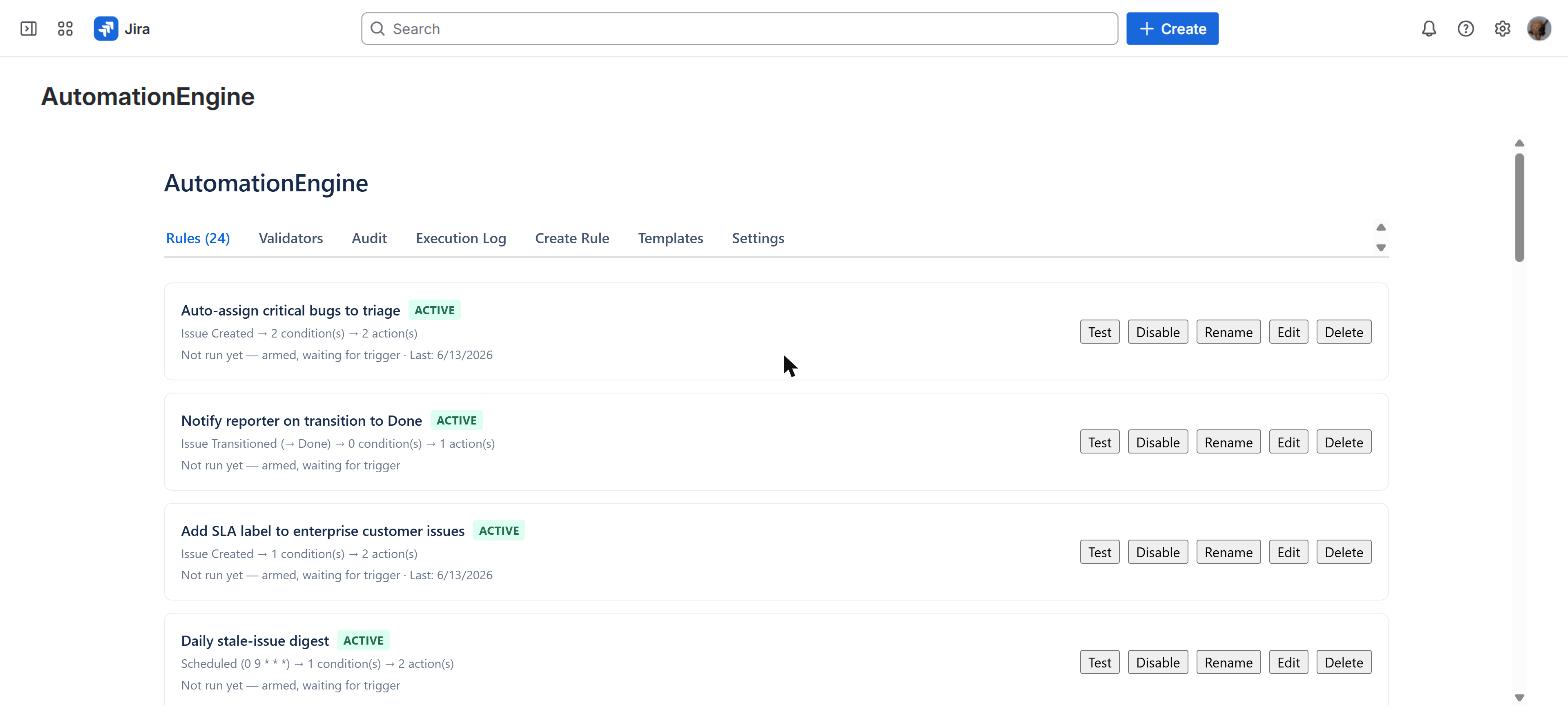
The Rules tab on a live Jira instance — Validators, Audit, and Execution Log sit alongside.
Blocks a transition before it happens · native Automation only fires after
Pre-transition gating: a jira:workflowValidator blocks the move on JQL, custom field, issue type, or priority — any combination
Custom block messages tell the user exactly why a transition was stopped
Free tier: 5 rules + 2 validators, 30-day audit · Standard from $1.75/user/mo
Checklists
ChecklistPro
Checklists that enforce your process — not just decorate your issues. Templates
auto-apply by issue type. A workflow validator blocks transitions until every item is
checked.
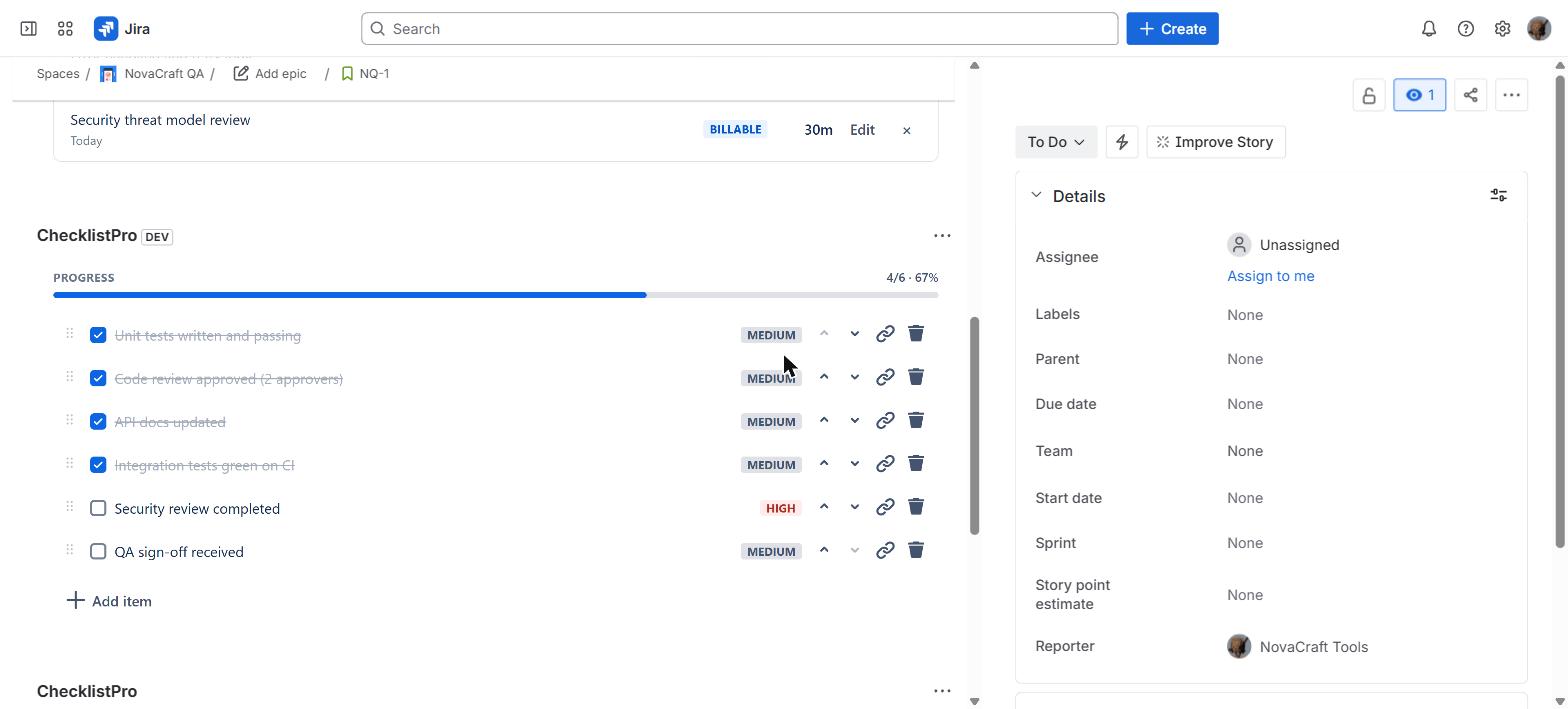
A real issue panel — 4 of 6 done, with per-item priority flags and a live progress bar.
Workflow validator blocks “Done” until checklist is 100% complete
Issue panel with drag-reorder, priorities, and per-item assignees
Visual progress bar with real-time completion percentage
Reusable templates auto-applied by issue type or project
Jira workflow validator for Definition of Done enforcement
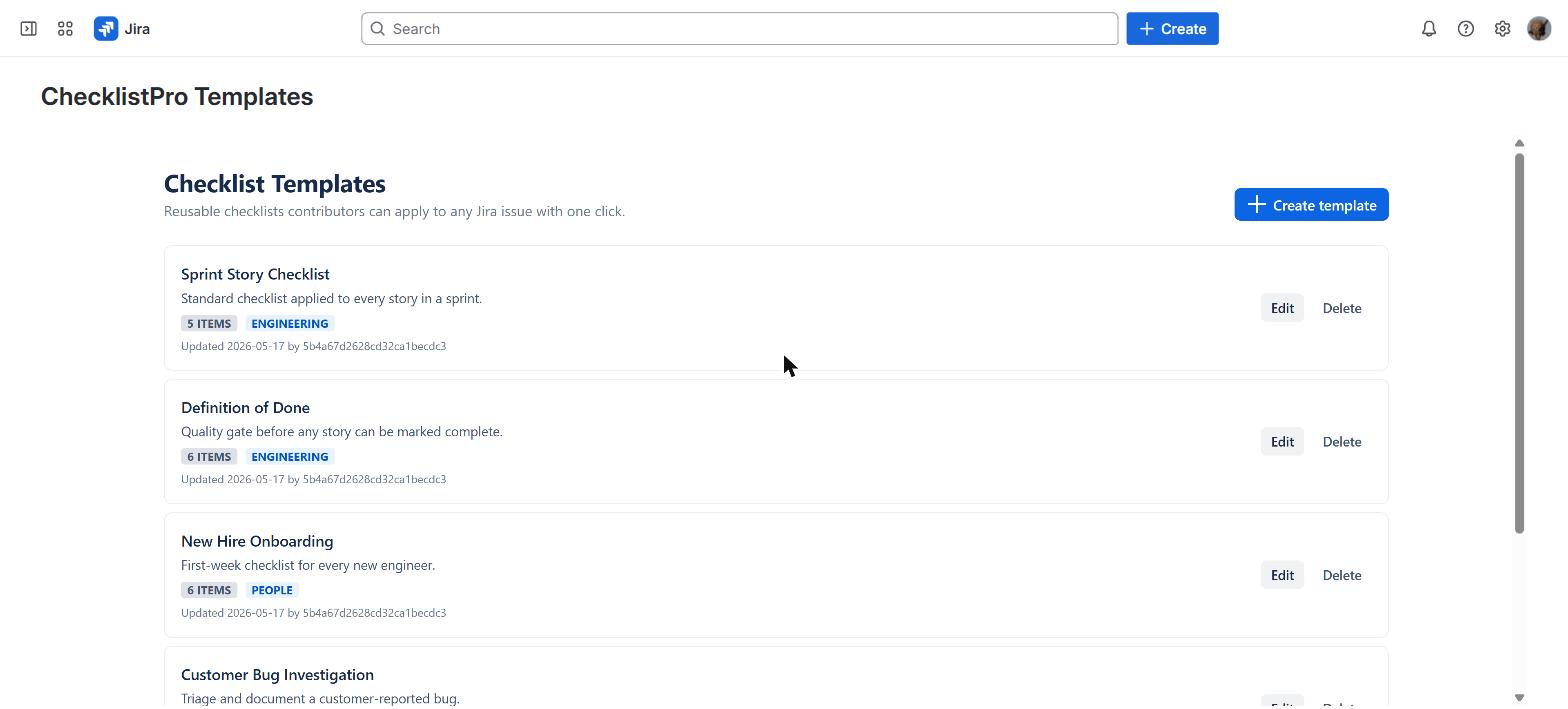
Global template management page for centralized control
Forge-native — zero external servers, zero outbound calls
Free tier: 3 items per issue · Pro from $1.50/user/mo
Time Tracking
TimeTracker Pro
One-click time logging from the issue panel. Inline editing, backdated entries,
daily caps, approval workflows, and CSV reports — at a fraction of Tempo's
price.
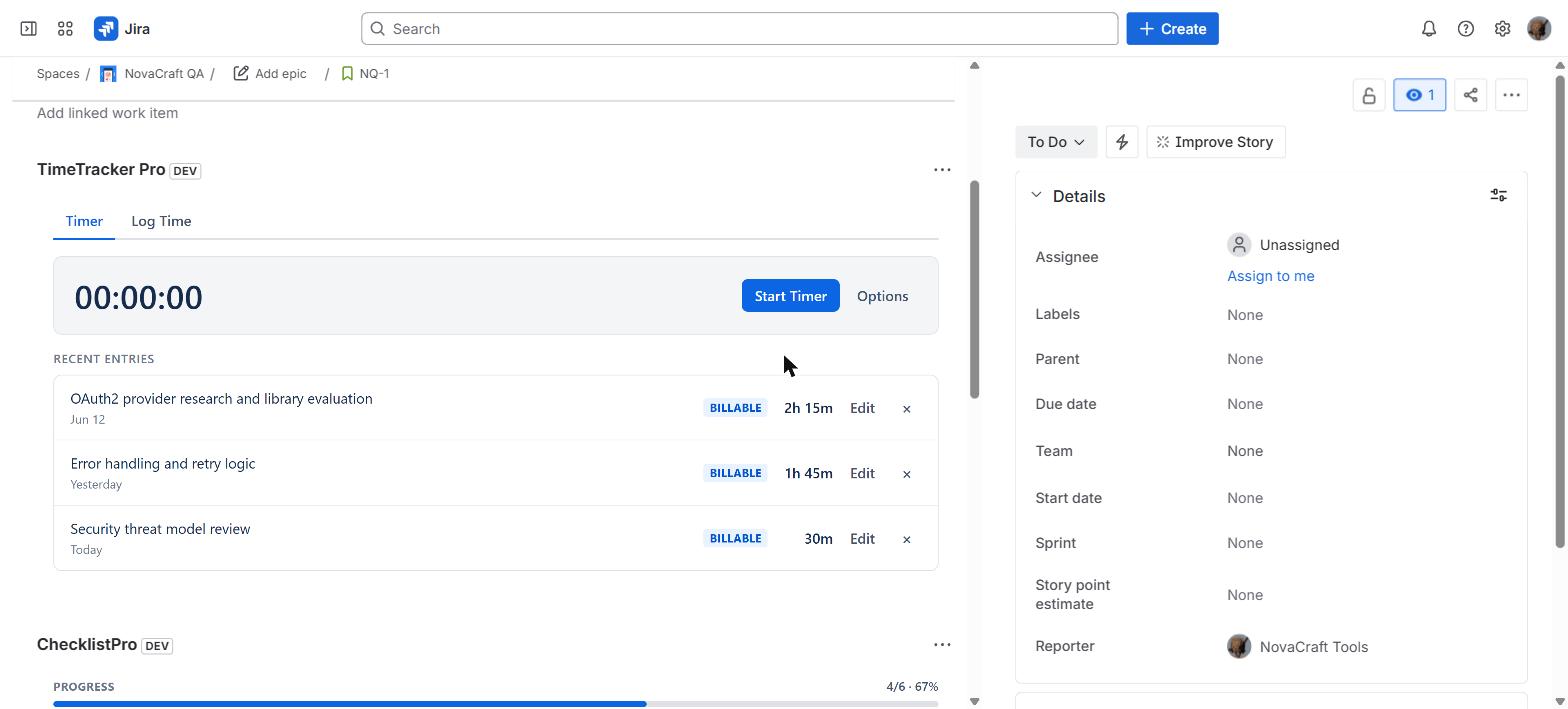
Logging time from the issue panel — billable entries, real durations, inline edit.
Daily cap warns before overlogging · manager approval with comments
One-click logging from any Jira issue panel
Inline editing: adjust hours, date, or notes after logging
Backdated entries for missed time — no admin needed
Daily cap with preview warning before overlogging
Global Reports: filter by user, project, date range + CSV export
Forge-native — zero external servers, zero outbound calls
Every image below is the actual app running on a live Jira Cloud instance —
captured, not designed. This is the real interface you'll be working in.
Captured on a live Jira Cloud instance
The Rules tab: each rule pairs a trigger (issue created, transitioned, or
scheduled) with conditions and actions. Validators, Audit, and Execution Log are
one tab away.
On the issue: a Definition of Done at 4 of 6, with priority flags and a live
progress bar.
Reusable templates a contributor applies to any issue in one click.
One-click logging from the issue panel — billable entries with real
durations.
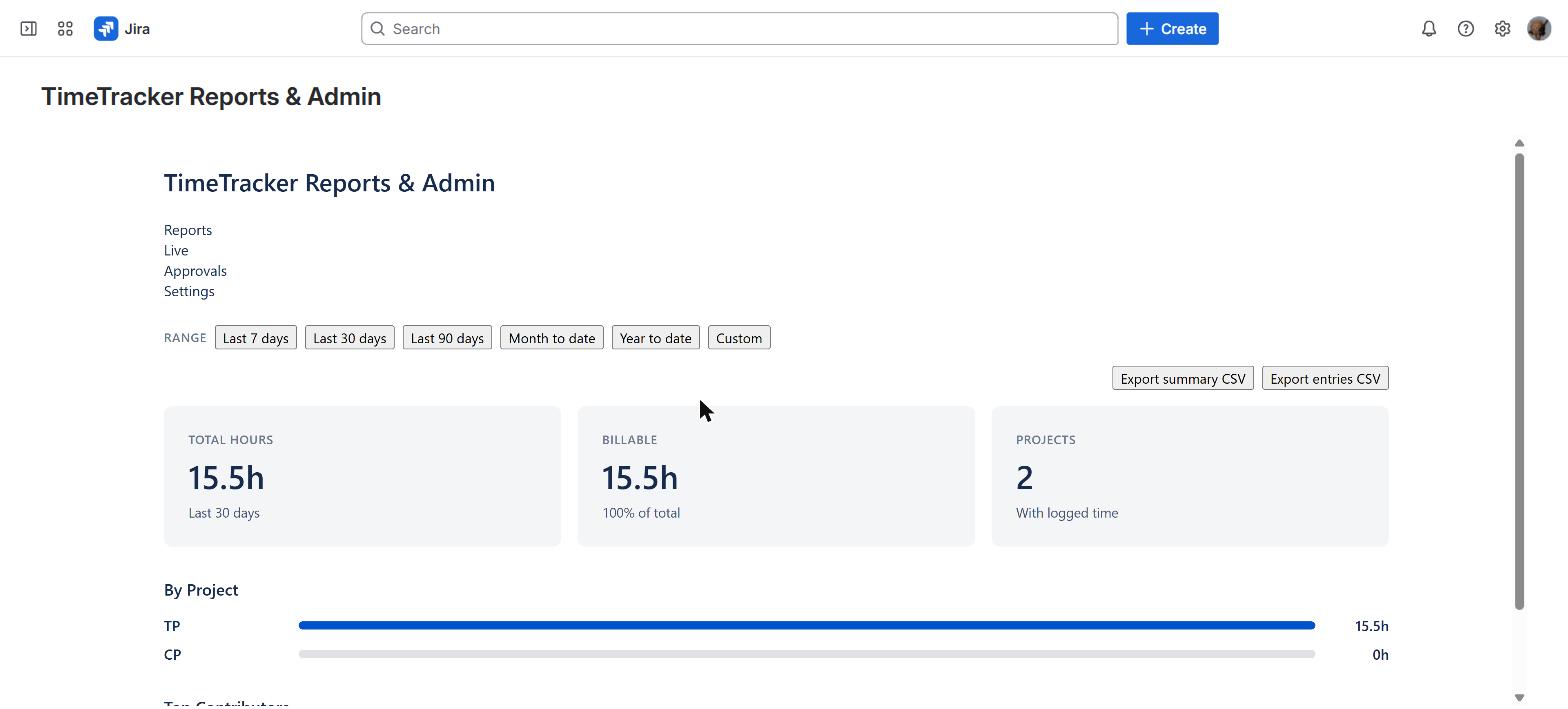
Reports with totals, a billable split, per-project breakdown, and CSV export.
ScriptRunner's Behaviors can gate a transition, but it costs you Groovy —
AutomationEngine does the same with Forge-native validators that check JQL, fields,
type, and priority, then block the move with a custom message. No scripting, and
every decision lands in a 365-day audit trail. We don't replace all of ScriptRunner
— we cover the workflow-validator niche, at ~45% less.
~45% lower cost
Tempo → TimeTracker Pro
Core time tracking. 40% less on your invoice.
One-click logging, inline editing, backdated entries, daily caps, approval workflows,
CSV reports. The features your team actually uses — without the enterprise
portfolio features inflating your bill. And your data stays entirely in Atlassian.
~40% lower cost · Forge-native
HeroCoders → ChecklistPro
Checklists that block transitions.
HeroCoders gives you checklists. We give you checklists with a workflow validator
that prevents issues from moving to "Done" until every required item is checked.
That's the difference between decoration and enforcement.
~37% lower cost
JMWE → AutomationEngine
Forge-native. Not Connect-dependent.
JMWE runs on Atlassian Connect, the older framework where apps host their own
servers. AutomationEngine is built on Forge — Atlassian's newer platform
where apps run inside Atlassian's own cloud. Your data never leaves your tenant.
Forge-native architecture
Pricing
Transparent pricing. No surprises.
Every app has a free tier. No credit card required. Pay annually and get 2 months
free.
Annual billing saves 2 months. Enterprise tier includes SLA, priority support, and
annual invoicing. All prices in USD.
ROI
The math on time tracking
If you bill clients or track project costs, the numbers speak for themselves.
$3
per user / month (Pro tier)
1 hr
recovered per user / week (industry average)
70×
return on cost (at $50/hr billing)
Example: 50-person agency billing at $75/hour
TimeTracker Pro costs $150/month for 50 users at $3/user. If proper time tracking
recovers just 30 minutes per person per week of previously unbilled time, that's
100 hours/month × $75 = $7,500 in recovered revenue. Your cost is $150.
That's a 50:1 return before you count the reduced admin time from approval workflows.
Trust & Security
Designed for the security review.
Built knowing they'd face procurement at serious companies. Here's what your security
team will find.
No external data processing
All app logic runs inside Atlassian's cloud. We don't operate infrastructure, so
there's nothing to audit beyond the app manifest.
Minimal scopes
We request only the permissions each app needs. ChecklistPro and
TimeTracker Pro don't request write:jira-work at all —
they only read issue data to render panels and checklists. AutomationEngine
requests it solely to run the rule actions you configure (such as
auto-assigning or labeling).
Data residency
Your data is stored in Forge Storage, which inherits your Atlassian data residency
settings. If your Jira data lives in the EU, so does your NovaCraft Tools data.
Vendor consolidation
Three tools, one vendor. One security review covers all three apps. One procurement
process. One vendor to manage. That matters when you're managing 40+ Marketplace
apps.
It means our apps run entirely inside Atlassian's infrastructure — not on
our servers. We don't have servers. Your data is stored inside your Atlassian
tenant, processed within Atlassian's cloud, and never sent anywhere else. For your
security team, it means there's no third-party infrastructure to evaluate.
The free tiers are permanent, not time-limited trials. AutomationEngine gives you
5 active rules with unlimited executions. ChecklistPro gives you 3 items per
issue (the workflow validator requires Pro). TimeTracker Pro gives you 5 users logging time with inline editing and daily cap
warnings (approval workflows and CSV export require Pro). Small teams can use these indefinitely.
You install the app from the Atlassian Marketplace and manage billing through your
Atlassian account. The Marketplace handles payments, invoicing, and license
management. Enterprise customers (1001+ users) get annual invoicing, an SLA, and
priority support.
Install our app, set up your rules/checklists/timers, and start using it alongside
your current tool. There's no data migration needed — our apps create their
own data structures in Forge Storage. Most teams run both tools in parallel for a
sprint or two, then sunset the old one. The free tier makes it zero-risk to try.
It's a Jira workflow validator that prevents status transitions (like moving to
"Done") unless all required checklist items are checked. This turns checklists
from a nice-to-have into actual process enforcement. You configure which
transitions require complete checklists, and Jira blocks the move until the
criteria are met. No workarounds.
Currently, all three apps are built for Jira Cloud. JSM support is on our roadmap.
If you need JSM or Confluence integration, email us at [email protected]
— it helps us prioritize.
Email [email protected]. Standard support targets a 48-hour response.
Enterprise customers get a 4-hour response SLA for critical issues. We're a small
team and we read every message ourselves — you won't get a chatbot.
Try any app free. No credit card.
Install from the Marketplace, start free, upgrade when ready. Two minutes.